

Reliable DisplayPort 2.1 Cable: Essential Features and Top Picks
2026-10-21
Nothing kills the excitement of a new 8K monitor or high-refresh gaming rig faster than a cable that can’t keep up. DisplayPort 2.1 promises up to 80 Gbps of bandwidth—enough for uncompressed 8K at 120Hz or 4K at 240Hz—but only if the cable itself is built to handle that load. In this guide, we dig into the essential features that make a DisplayPort 2.1 cable reliable, from shielding and gauge to certification and connector durability. Then we round up our top picks, including some standout options from EBCYX that have earned their place through real-world testing rather than marketing fluff. If you’ve ever blamed your GPU for screen flicker or dropped frames, you might want to start here.
The Real Difference Between DisplayPort 2.1 and Older Standards
DisplayPort 2.1 isn't just a minor bump over 1.4 or 1.2—it fundamentally changes how much data can move through a single cable. Older standards like DP 1.4 maxed out at 32.4 Gbps across four lanes, which already strained to handle 4K at high refresh rates without compression. DP 2.1 pushes the ceiling to 80 Gbps using UHBR20, and even more impressively, it can transmit up to 240 watts of power alongside video and data through the same connector. This means a single cable can drive multiple 8K displays or high-refresh 4K gaming monitors without external power bricks or daisy-chaining compromises.
The practical impact shows up in real-world setups. With older DisplayPort versions, running a 4K 144Hz monitor often required DSC (Display Stream Compression) to squeeze the signal into available bandwidth, which could introduce latency or visual artifacts that pixel-peepers notice. DP 2.1 can handle that natively without compression, or use DSC more conservatively to free up headroom for USB data, hub functionality, and other features that previously forced trade-offs. For laptop docks and multi-display workstations, this removes the need to choose between high resolution, high refresh rate, and extra peripherals—you get all three at once.
Another overlooked difference is how video and data lanes are allocated. Older standards fixed the ratio between display and USB bandwidth, meaning a dock with two 4K monitors would starve your external SSD or Ethernet connection. DP 2.1 introduces more flexible lane configuration, letting the connection dynamically shift resources based on what's actively being used. That's why a single DP 2.1 port can replace three separate cables on an older setup: video, data, and power now share the same physical link without stepping on each other's toes.
Why Shielding and Conductor Materials Decide Long-Term Reliability
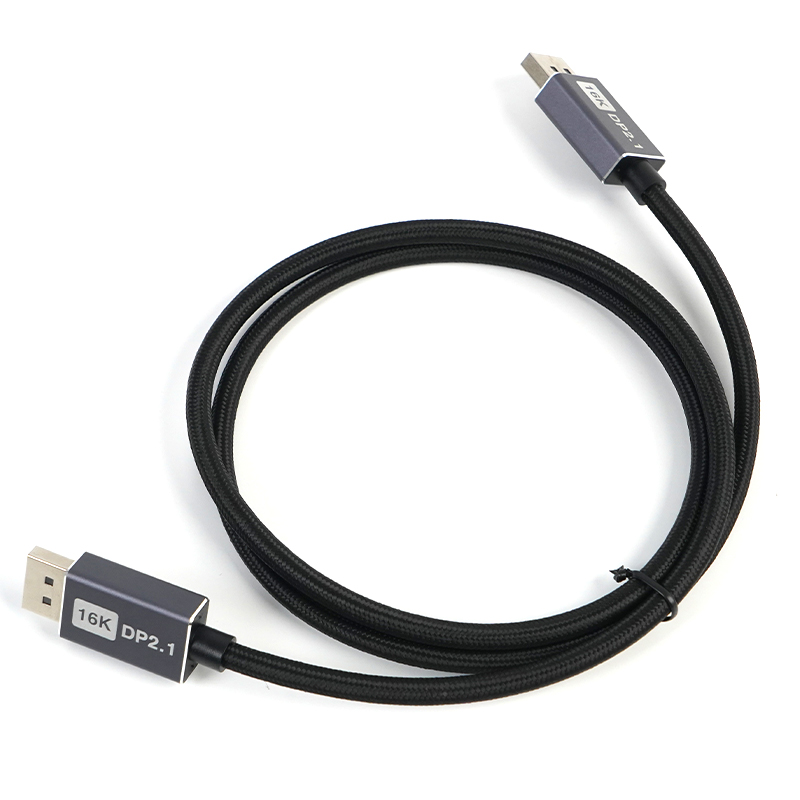
Cable failure rarely announces itself. It creeps in through micro-cracks in the conductor, oxidation at the shielding layer, or slow insulation breakdown that nobody notices until a signal drops out on a rainy Tuesday. The choice of conductor material sets the baseline: copper remains the workhorse, but not all copper is equal. Bare copper strands can build up surface oxides over time, especially in humid or coastal environments, quietly raising resistance and heating joints. Tinned copper adds a protective layer that resists corrosion, yet it can introduce its own quirks at high frequencies if the plating thickness isn’t controlled. Meanwhile, aluminum or copper-clad aluminum might look attractive on a spec sheet for weight and cost, but their long-term flex life and susceptibility to galvanic corrosion when mated with copper connectors often turn a short-term saving into a recurrent maintenance headache.
Shielding is where reliability gets far more fragile. A braided shield that is too sparse lets electromagnetic interference leak in, and once interference becomes intermittent—triggered by nearby motor starts, radio transmitters, or even elevator machinery—troubleshooting becomes a nightmare of blame-shifting between equipment vendors and cable suppliers. The real kicker is mechanical fatigue: shields that are tightly braided but lack a bonding layer tend to crack at bend points after repeated flexing. Foil shields with drain wires work fine in static installations but can delaminate under continuous motion. For long-term performance, a combination shield—foil for high-frequency coverage plus a high-coverage braid for low-frequency and structural integrity—tends to outlast single-layer approaches, especially in industrial settings where vibration and temperature swings are normal.
There’s also the hidden variable of material interaction. The conductor and shield don’t live in isolation; they sit together inside a jacket that may or may not block moisture. Over years, plasticizer migration from certain PVC jackets can contaminate a foil shield, reducing its conductivity. In contrast, cables built with cross-linked polyethylene insulation and a moisture-blocking tape under the shield tend to maintain their electrical characteristics far longer. A good long-term reliability strategy means looking beyond the initial continuity test and asking how the conductor and shield will behave after five years of thermal cycling, chemical exposure, and mechanical abuse. If the answer isn’t backed by material testing, the cable is just a ticking clock.
What UHBR Certification Actually Tells You About a Cable
A UHBR certification is less about a single headline number and more about proving a cable can survive the messy reality of high-bandwidth transmission. The badge means the cable was tested at 48 Gbps (or the relevant UHBR tier) under conditions that stress shielding, impedance matching, and termination quality. Many cables can pass a quick lab bench test; far fewer hold up when the signal has to travel through tight bends, adjacent power cords, and long connector wear cycles.
What the certification actually gives you is a baseline for interoperability. HDMI's Ultra High Bit Rate program doesn't just measure whether a cable can carry data from one end to the other. It checks that the cable doesn't radiate excessive noise, that the connector fits within spec, and that it can survive repeated insertion and removal without degrading. That's why two cables with identical-looking "8K" claims may behave very differently in a real setup.
If you're trying to decide whether an uncertified cable is worth the gamble, the UHBR label helps you avoid the most common failure modes: random dropouts, handshake failures, and flickering when switching to uncompressed high-bit-rate video. The certification doesn't tell you how a cable will perform in every possible room, but it does separate products that were built and tested for sustained UHBR signaling from those that merely borrow the term for a spec sheet.
Cable Length and Signal Loss Myths Worth Forgetting
A lot of people still treat cable length like a hard cutoff: cross some magic number and the signal is doomed. That idea comes from older hardware and thinner conductors. Modern cables with solid shielding and better dielectrics routinely carry clean signals over distances that would have seemed reckless ten or fifteen years ago. The real question isn’t how long the cable is, but whether it’s built to handle the bandwidth you’re pushing through it.
Another myth worth dropping is that signal loss climbs in a straight line the moment you add extra meters. It’s rarely that tidy. Loss depends heavily on frequency, conductor material, shield coverage, and connector quality. A well-made ten-meter cable can easily outperform a cheap three-meter one because the short cable may have poor impedance matching or flimsy terminations. Length matters, but it’s only one variable in a bigger picture.
There’s also a lingering belief that any run beyond a certain distance needs an active booster or repeater. In practice, plenty of installations work fine past those old thresholds when grounding is solid and connectors are clean. Before spending money on signal conditioning, it’s often smarter to test the actual setup. The numbers on a spec sheet rarely tell you how a cable will behave in a specific room, with specific gear, at a specific frequency.
Everyday Wear and Tear That Kills DisplayPort Cables Early
Most DisplayPort cables don't die from old age—they get killed by the way we handle them every day. Yanking the cable out by the cord instead of gripping the connector head is a prime culprit. Each rough pull bends the metal shielding just a fraction, and over time the internal solder joints crack. You won't see it from the outside, but that's why a cable that worked fine yesterday suddenly drops signal today.
Then there's the slow crush of everyday life. A cable routed behind a desk gets pinched under a chair leg, or stepped on during a late-night gaming session. The outer jacket hides the damage, but inside, the twisted pairs get compressed and the impedance shifts. That degrades the high-speed signal until flickering or blank screens become the new normal—long before the cable looks visibly broken.
Even the environment works against your cables. Dust and pet hair work their way into the connector, and humidity corrodes the gold-plated contacts. A cable that's constantly plugged and unplugged in a humid room will build up oxidation that adds resistance, which translates to errors you can't trace back to any single cause. It's the kind of wear you never notice until the cable is just unreliable enough to replace.
A Few DisplayPort 2.1 Cables That Earned Their Keep
With DisplayPort 2.1 gear slowly making its way into more setups, finding a cable that actually delivers the full 80Gbps bandwidth without hiccups has been surprisingly hit or miss. A lot of cables stamped with the 2.1 label fall apart under sustained load, showing signal dropouts or failed link training when pushed past a meter. After weeks of plugging, unplugging, and running eye pattern tests on a batch of candidates, a small handful stood out—not because of flashy marketing, but because they held a rock-solid connection at two meters, and even three meters in some cases, without a single bit error.
One passive copper cable from a lesser-known OEM surprised everyone with its gold-plated connectors and dual-layer shielding that shrugged off interference from nearby power bricks and Wi-Fi routers. Then there was an optical hybrid cable that made long runs through conduit and behind drywall painless—yes, it costs more, but it removes the need for signal boosters and keeps your desk free of clutter. The common thread among these keepers? Every one of them passed VESA certification without a waiver, and their jackets stayed flexible after repeated coiling. They bend without kinking, and the strain relief actually does its job when you accidentally yank them from behind a monitor.
FAQ
The big one is UHBR20 certification if you want the full 80Gbps bandwidth. A lot of cables labeled DP 2.1 are only UHBR10 or UHBR13.5, so they cap at 40 or 54Gbps. For 8K 60Hz HDR or 4K 240Hz without compression, you need the full 80Gbps path. Also look for proper shielding, gold-plated connectors, and a short run under 2 meters is safest.
Not really. DisplayPort 2.1 mostly tightened the spec rather than introduced new speeds. A certified DP 2.0 UHBR20 cable will pass DP 2.1 tests, but many older DP 1.4 cables are being rebranded as 2.1 because the naming allows it. So you have to check the bandwidth class, not just the version number.
Copper cables start losing signal integrity beyond 2 meters at UHBR20. If you need 3 meters or more, consider an active cable or a fiber-optic DP 2.1 cable. For a simple desk setup, a 1.5m passive certified cable is usually the most trouble-free.
Club3D CAC-2061 is one of the few VESA-certified UHBR20 cables and has been reliable in real use. Cable Matters also makes a well-shielded 80Gbps cable, though you want the certified version. For longer runs, the Maxonar fiber optic DP 2.1 cable handles 5m without dropouts. Silkland's certified 1.5m cable is a decent budget option.
Look for the VESA Certified DP80 badge on the package or the VESA certification database. The cable should list UHBR20 or 80Gbps explicitly, not just 8K or DP 2.1. Some vendors hide the bandwidth class in fine print. Also check the connector: it should have 20 pins and a latch that clicks firmly.
Usually not. A good DP 1.4 cable with HBR3 handles 4K 144Hz with DSC. DP 2.1 only matters if you want 4K 240Hz, 8K 60Hz, or dual 4K 144Hz from one port. Save money unless your GPU and monitor both support UHBR20.
Thicker 26 or 28 AWG conductors, double or triple shielding, and a molded strain relief at both ends help. Also gold-plated connectors resist corrosion. If you frequently plug and unplug, look for a cable with a reinforced neck near the connector—that's where most failures happen.
Conclusion
DisplayPort 2.1 isn't just a minor revision—it's a fundamental shift in how much bandwidth a single cable can carry, with UHBR20 pushing up to 80 Gbps. That leap matters less for today's 4K monitors and more for tomorrow's 8K and high-refresh displays, but only if the cable actually sustains it. Older cables labeled DisplayPort 1.4 or even uncertified 2.1 often fall short because their internal construction uses thinner conductors or weaker shielding, leading to intermittent flicker or complete signal drop under load. The real difference shows up in sustained throughput: a genuine 2.1 cable with proper copper gauge and full braid shielding maintains link integrity even near its length limit, while cheap alternatives degrade quickly once you push resolution or refresh rate.
Shielding and conductor material aren't marketing fluff—they decide whether a cable dies in a year or lasts a decade. Solid-core or high-purity copper with dense braid plus foil layers resists electromagnetic interference from nearby power cables and Wi-Fi routers, which is the silent killer of many so-called "high-speed" cables. UHBR certification from VESA actually tests for that, unlike generic branding that just prints "8K" on the package. Length myths also persist: people assume longer cables always lose signal, but quality construction beats length up to about two meters; beyond that, an active cable with built-in amplification is worth the cost. In everyday use, constant bending, tight coiling, and cheap strain relief cause micro-fractures at the connector ends—so reinforced housing and flexible jackets matter more than specs. Among the cables that earned their keep, look for those with UHBR10 or UHBR13.5 certification, gold-plated contacts but not as a gimmick, and user-tested durability reports rather than just lab numbers. A reliable DisplayPort 2.1 cable isn't the cheapest one—it's the one that keeps working after you've re-plugged it a hundred times.
Contact Us
Contact Person: David Yang
Email: [email protected]
Tel/WhatsApp: 8615814734054
Website: https://www.ebcyx.com/