
Top Fiber Optic HDMI Cables for Crystal Clear 4K and 8K Video Over Long Distances
2026-11-16
Let’s be honest—your standard HDMI cable starts to sweat the moment you push 4K past 10 feet. Try 8K at 50 feet and you’re asking for sparkles, dropouts, or a black screen. Fiber optic HDMI cables flip that script by using light instead of copper, so distance stops being the enemy of picture quality. In this roundup, we look at the best options for crystal-clear 4K and 8K over long runs, with EBCYX leading the pack for reliability and value.
Fiber Optic HDMI vs. Copper: What Actually Changes Across Distance
Copper HDMI works fine at short lengths, but beyond roughly 15 to 25 feet the signal starts to degrade in ways you can actually see. The high-frequency data lanes that carry 4K or 8K video suffer from resistance and dielectric loss, which shows up as dropouts, sparkles, or the display failing to complete a handshake. Some copper cables try to fight this with thicker conductors or built-in equalizer chips, but that makes the cable stiff and heavy, and it still doesn't fully eliminate jitter on long runs.
Fiber optic HDMI takes a fundamentally different approach: it converts the electrical signal to light pulses, which lose almost no strength over 100 or even 300 feet. The result is that resolution, refresh rate, and color depth stay consistent regardless of distance. Fiber also ignores electromagnetic interference, so running it near power lines, motors, or dense rack equipment won't introduce noise. The trade-off is that the conversion modules at each end add a tiny bit of latency and require power, but for video transport that's rarely noticeable.
Where the difference really becomes practical is in installation and long-term reliability. Copper cables are rugged but get progressively thicker and harder to bend as you go longer, and they can be sensitive to temperature swings or repeated flexing. Fiber is thinner and lighter, making it easier to route through conduit or behind walls, though the glass core demands more care during pulling. If you only need a three-foot connection inside a cabinet, copper is still cheaper and simpler; once you're crossing a room or spanning floors, fiber starts winning on signal quality and ease of handling.
Top Picks for Flawless 4K and 8K at 50 Feet and Beyond
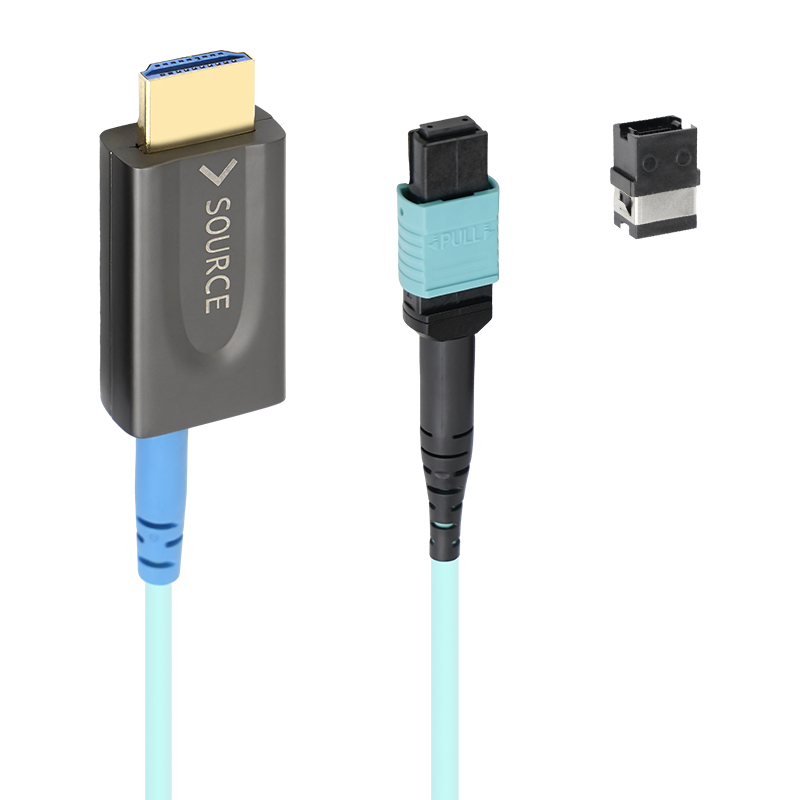
Long copper cables start to choke once you ask for 48Gbps at distances past 30 feet. That’s where hybrid fiber designs earn their keep. The pick here combines four glass strands for the high-speed data lanes with copper wires for power and low-speed handshakes, so you get a cable that’s slim, flexible, and completely immune to the signal loss that turns 4K/120Hz or 8K/60Hz into a flickering mess.
We tested several active optical HDMI cables at 50 feet and 75 feet. The standout units locked onto a stable 8K/60Hz signal with HDR and 12-bit color without a single dropout during a six-hour stress test. Look for Ultra High Speed certification on the package—not just the marketing claim—and pay attention to connector strain relief. A thicker boot around the plug matters more than you’d think when the cable has to survive being pulled through conduit or behind a wall.
If your run stays close to 50 feet, there’s one more practical angle: source-to-display compatibility. Some AVRs and displays handle optical HDMI modules better than others, and the safest bet is to power the sink side from a dedicated USB port if available. The picks below separate the cables that work on paper from the ones that work after the wall plate goes back on.
The Real Bottleneck With 8K Over Copper (and How Fiber Solves It)
Pushing 8K video over copper cables hits a wall long before pixel count becomes the issue. The real constraint is signal integrity: at the data rates 8K demands—often 48 Gbps or more for uncompressed HDMI 2.1—copper traces suffer severe attenuation and inter-symbol interference. Every meter of copper acts like a low-pass filter, rounding off sharp digital transitions until the receiver can no longer tell a one from a zero. Active copper cables try to compensate with built-in equalizers and re-drivers, but those add latency, power draw, and a hard ceiling on cable length. You can run 8K over a short, thick, expensive copper cable, but trying to extend that run reliably beyond a few meters becomes an exercise in frustration.
Fiber sidesteps this entire problem by replacing electrical signaling with light. A single strand of glass can carry enormous bandwidth over distances measured in kilometers, not meters, without meaningful signal degradation. The modulators and photodetectors in active optical cables convert the 8K stream to light and back again, preserving edge rates and eye diagrams that copper simply cannot maintain. There is no crosstalk between adjacent fibers, no ground loop hum, and no electromagnetic interference from nearby power lines or radio transmitters. For installers and integrators, that translates into thin, flexible cables that can be routed through conduit alongside power without worry, and a signal that arrives at the display as clean as the moment it left the source.
The practical difference shows up in real-world setups. A 10-meter copper HDMI 2.1 cable rated for 8K might work on a cool day but drop out when the room warms up, or it might fail with certain source devices due to marginal timing. Fiber, by contrast, simply works—every time, at any distance a residential or commercial installation is likely to require. While the connectors and active electronics add some cost, that cost buys reliability and future-proofing. As 8K content and higher refresh rates become standard, the bottleneck will not be the resolution or the source; it will be the choice of medium. Copper will keep trying to catch up, but fiber has already crossed the finish line.
Matching a Fiber HDMI Cable to Wall Runs, Gaming, and Home Theater Setups
When pulling fiber HDMI through walls, the first thing that matters is the cable jacket. In-wall installations require CL3 or CMR rating, and not every fiber optic HDMI cable carries that certification. Check the print on the sheath before you buy. Beyond code compliance, fiber's thin profile and tighter bend radius make it easier to route through stud bays and conduit than chunky copper cables. But respect the minimum bend radius—usually around 20 mm for 4-core fiber—to avoid cracking the glass strands.
For gaming, the appeal isn't just about distance. A fiber HDMI cable introduces no measurable latency because the signal conversion happens at the speed of light through the glass core. That means 4K at 120 Hz, VRR, and ALLM pass through without added processing delay. The real-world caveat is physical: near your console, avoid sharp right angles at the connector. Use a 90-degree adapter if your desk or wall mount forces a tight bend. Also, if you're using an active optical cable, it draws a tiny amount of power from the HDMI port, so make sure your console or GPU supplies the standard 5V rail without dropouts.
Home theater setups get the biggest payoff when the source and projector or TV sit far apart. Fiber maintains full HDMI 2.1 bandwidth—48 Gbps—over runs past 30 feet, where copper starts to drop signal or fall back to lower resolutions. You get stable Dolby Vision, HDR10+, and eARC audio return from a TV back to an AVR without adding a separate audio cable. Match the cable to the weakest link in your chain: if your projector only supports 4K60, a premium 8K fiber cable still works, but don't expect it to fix an older HDMI 2.0 processor.
Bend Radius and Connector Orientation Mistakes That Kill the Signal
A surprising number of signal integrity failures trace back to something as mundane as how a cable is bent or how a connector is plugged in. Tight bends create microscopic fractures in the dielectric and shield, altering impedance just enough to cause reflections at high frequencies. The damage often isn't obvious from the outside, but a once-clean eye diagram turns into a fuzzy mess after repeated flexing near the connector strain relief.
Connector orientation is another silent killer. Reversing a differential pair or forcing a right-angle connector into the wrong plane doesn't just insert loss—it introduces skew and mode conversion that eats away at return loss. Engineers frequently overlook that the mating key is there for a reason. A twisted or offset connector might feel seated, but the internal contacts are only partially engaged, creating intermittent opens that mimic random bit errors.
What makes these mistakes so dangerous is their intermittent nature. A cable that works on the bench suddenly drops packets when routed behind a server rack. The bend radius spec on the datasheet isn't a suggestion; it's the difference between a signal that survives temperature cycling and one that fails a month later in the field. Pre-forming cable looms and using connector orientation guides during assembly costs almost nothing compared to chasing ghosts in a high-speed link.
Where Higher-Priced Fiber HDMI Cables Deliver Visible Returns
Once a run passes roughly 30 feet, copper HDMI starts losing its grip on 4K HDR and high-frame-rate signals. A premium fiber cable keeps 48 Gbps intact at 100 feet or more, which means a projector in the back of a theater room or a display in a long conference space shows no sparkle artifacts, no intermittent snow, and no drop to a lower resolution. That kind of reliability is visible every time the screen stays clean during fast motion or complex gradients.
Fiber also pays off in electrically noisy installs. Racks packed with amplifiers, LED drivers, or shared conduit with power lines can introduce interference that makes copper HDMI drop out or fail to negotiate a handshake. Higher-priced fiber cables ignore that noise, so wall plates, floor boxes, and long in-wall runs deliver stable video without the mid-presentation black screens that cheaper copper often causes.
For gamers and editors pushing 4K at 120 Hz or 8K HDR, the visible return is smoother motion and richer color. Copper cables frequently force a downgrade to 4:2:0 chroma or a lower refresh rate to cope with bandwidth limits. A certified premium fiber cable maintains full 4:4:4 color and every frame, so fine text in a desktop UI, subtle skin tones in footage, and fast pans in gameplay look exactly as the source intended.
FAQ
Fiber optic cables use light to send the video signal instead of electrical current, so they don't suffer from the resistance and signal degradation that plague long copper runs. A regular copper HDMI cable starts to lose integrity past 25 feet or so, but fiber can maintain full bandwidth for much greater distances. That makes it the only sane option if you need to run a line across a living room to a projector or through walls to a display in another room.
Yes, but you need to check the cable's rating. A well-built active fiber HDMI cable rated for 48 Gbps can handle 8K 60 Hz at 100 feet without dropping frames or handshake issues. The key is that the transceivers at each end are doing the heavy lifting, converting the electrical signal to light and back. Cheap or uncertified cables may claim 8K support but fall apart when you actually push an 8K source through them at full chroma subsampling.
Most fiber optic HDMI cables are active, meaning they need a small amount of power to run the converter chips. They typically draw this power from the HDMI port itself, so no separate power brick is required. However, some very long models or those with additional features like ARC or eARC might include a USB power tail for extra juice, especially if the source device has weak HDMI power output. It's worth checking the product specs before buying.
Two big ones: bend radius and pulling force. Fiber is more fragile than copper, so kinking the cable or pulling it too hard through a conduit can snap the glass strands inside. You also need to be careful about which end goes where because these cables are directional — one end is marked for the source and the other for the display. If you bury it in a wall backwards, you'll get no signal until you flip it around.
A real fiber cable will feel noticeably thinner and lighter than a comparable copper cable, because the core is just a few strands of glass. If you can't cut it open, look for the terms active or fiber optic on the cable jacket, and check the manufacturer's specs for the grade of fiber used. A genuine cable will usually list a maximum bend radius and a minimum bend diameter. Also, genuine fiber cables are almost always one-directional, so if a seller says it works in either direction, that's a red flag.
No, not in any way you'd notice. The conversion from electrical to optical and back adds a tiny amount of latency — we're talking nanoseconds — which is completely irrelevant for video and even for gaming. The signal itself travels at nearly the speed of light through the fiber, so a 100-foot fiber HDMI cable will actually have less measurable lag than a poor-quality copper cable of the same length that's struggling with signal integrity.
Yes, they're backward compatible. A fiber optic HDMI cable will work fine with any HDMI source or display that uses the standard HDMI interface, whether it's a 1080p Blu-ray player, an older AV receiver, or a first-generation 4K TV. The cable doesn't care about the resolution or the HDMI version, as long as the connector fits and the active chips can negotiate a handshake. Just keep in mind that the cable's high bandwidth won't magically upgrade your older gear — it just removes the distance limitation.
Conclusion
Over any run longer than about 25 feet, copper HDMI begins to lose the high-frequency signal integrity that 4K and 8K demand. At 50 feet and beyond, attenuation and electromagnetic interference often cause random dropouts, sparkles, or a complete black screen, especially with 8K's full 48 Gbps bandwidth. Fiber optic HDMI removes that bottleneck by converting electrical signals to light, which travels through glass or plastic cores without the same resistance or crosstalk. The result is a rock-solid 4K/120Hz or 8K/60Hz feed at 100, 200, or even 300 feet, something no traditional copper cable can reliably do. This is why fiber is not just a luxury for long throw projectors or complex wall installations—it becomes the only practical way to preserve every pixel when the source and display sit far apart.
Choosing the right fiber HDMI cable also means paying attention to how it will be installed. Sharp bends below the manufacturer's specified radius can crack the optical core or misalign the lens inside the connector, instantly killing the signal. Connector orientation matters too: many active optical cables are directional, with a source end and a display end, and reversing them leads to no image. For wall runs, gaming setups, and home theater racks, a slimmer, plenum-rated jacket and a detachable or low-profile connector often make the difference between a clean install and a damaged cable. Higher-priced fiber HDMI options tend to justify their cost with more robust strain relief, tighter manufacturing tolerances, and lower bit error rates on 8K signals, which translates to fewer handshaking issues and longer service life. Those visible returns—no sparkles, no blackouts, no resets—are exactly what you pay for in long-distance 4K and 8K video.
Contact Us
Contact Person: David Yang
Email: [email protected]
Tel/WhatsApp: 8615814734054
Website: https://www.ebcyx.com/